![Featured image of post [Linux] btop++ 시스템 리소스 모니터 소개](/post/2022-04-15-btop/wordcloud_hu_c880279bc6b18c26.webp)
리눅스를 사용할 때 top 명령어로 CPU를 모니터링해 본 적이 있는가? 너무 단순한 UI에 아쉬움을 느낀 적이 있는가? CPU 말고 메모리·디스크·네트워크·프로세스를 한 화면에서 보고 싶었다면, **btop++**이 그 답이 될 수 있다. 본 글에서는 btop++의 개요, 설치 방법, 주요 기능, UI 구성, top/htop과의 비교, 장단점과 참고 문헌까지 정리한다.
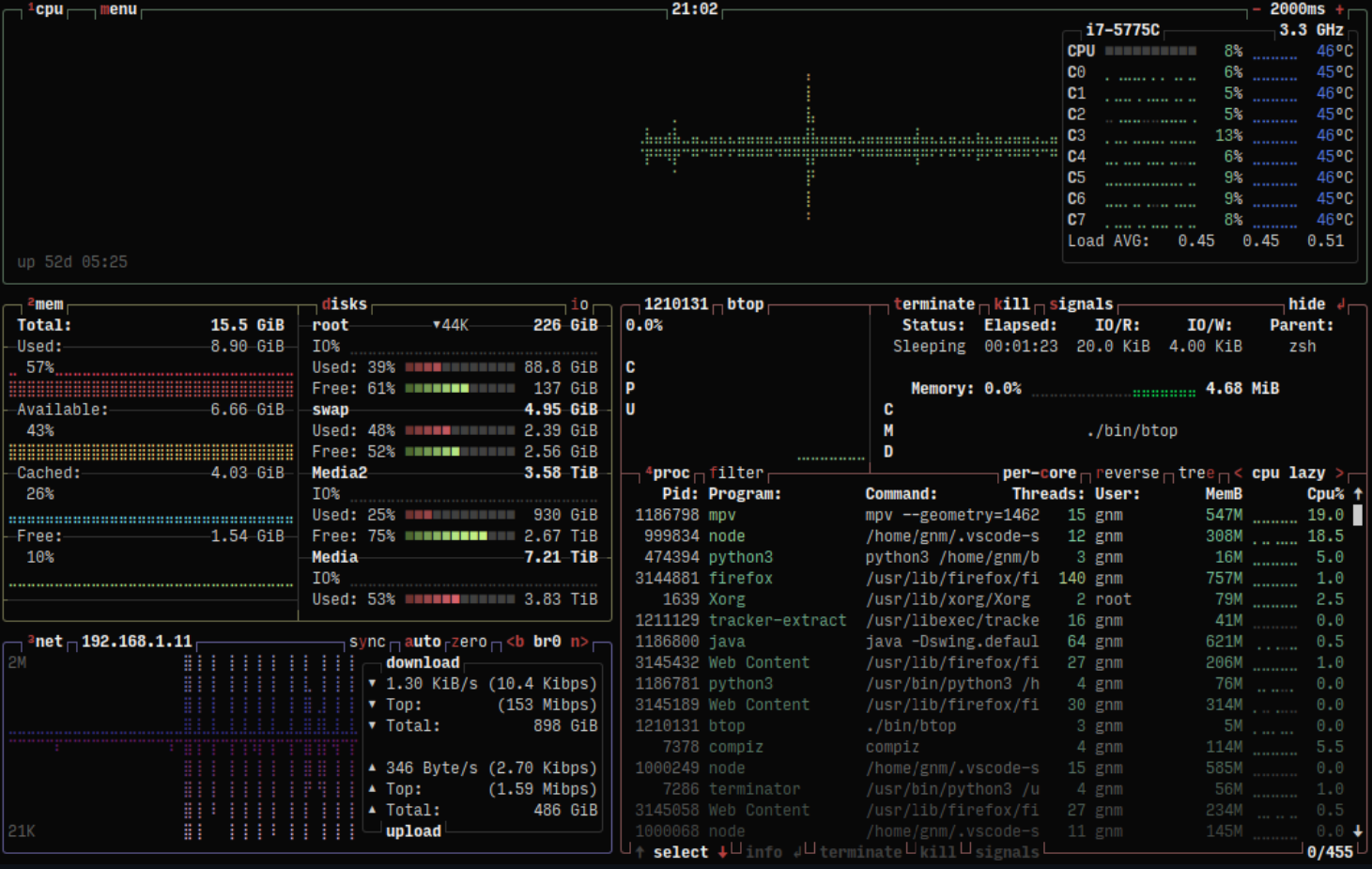
btop++을 실행하면 아래 그림처럼 다양한 리소스 사용량을 한 화면에서 모니터링할 수 있다.
 |
|---|
| btop++ 메인 UI: 선택한 프로세스의 상세 정보 표시 |
개요
btop++이란?
**btop++**은 aristocratos/btop에서 개발하는 시스템 리소스 모니터다. 프로세서(CPU), 메모리, 디스크, 네트워크, 프로세스 목록을 실시간으로 보여 주며, bashtop과 bpytop을 C++로 재작성·계승한 프로젝트다. Linux뿐 아니라 macOS, FreeBSD, NetBSD, OpenBSD 등에서도 동작한다.
추천 대상
- 서버·PC에서 CPU/메모리/디스크/네트워크 사용량을 한눈에 보고 싶은 사용자
top·htop보다 보기 좋고 정보량이 많은 터미널 모니터를 찾는 사람- 마우스 지원, 테마, 그래프 형태의 히스토리가 필요한 관리자·개발자
프로젝트 정보 및 특징
aristocratos/btop 저장소에서 소스, 이슈, 릴리스, 문서를 확인할 수 있다.
대표적인 특징은 다음과 같다.
- bashtop/bpytop의 C++ 재작성 버전: 성능과 이식성 향상
- 다중 리소스 모니터링: 프로세서, 메모리, 디스크, 네트워크, 프로세스 목록
- 게임형 메뉴 시스템: 직관적인 메인·옵션·도움말 메뉴
- 전체 마우스 지원: 강조된 키는 모두 클릭 가능, 프로세스 목록·메뉴 박스에서 스크롤 지원
- 프로세스 제어: 필터링·정렬·트리 뷰, 선택 프로세스에 시그널 전송, 목록 일시정지
- 네트워크·디스크: 사용량 그래프, 디스크 IO 속도·활동 표시
- 테마·커스터마이징: bpytop/bashtop과 호환되는 테마, 그래프 심볼·프리셋 선택
설치 방법
Linux (패키지 매니저)
- Fedora / RHEL 8+ (EPEL)
sudo dnf install btop(RHEL 계열은sudo dnf install epel-release후 설치) - openSUSE Tumbleweed
sudo zypper in btop - Ubuntu 등 Debian 계열
저장소에 따라apt install btop또는 최신 릴리스에서 바이너리 다운로드 후make install
Linux (소스·릴리스 바이너리)
- 최신 릴리스에서
btop-(VERSION)-(ARCH)-(PLATFORM).tbz다운로드 후 압축 해제 - 해당 폴더에서
sudo make install(설치 경로는PREFIX=/target/dir로 지정 가능) - (선택) 모든 프로세스에 시그널 전송·Intel GPU/CPU 전력 모니터링 등:
sudo make setcap또는sudo make setuid
소스 컴파일은 저장소 클론 후 make → sudo make install이며, GPU 지원 등 옵션은 README의 Compilation 섹션을 참고하면 된다.
macOS
- Homebrew
brew install btop
기타
- FreeBSD:
pkg install btop - NetBSD:
pkg_add btop
주요 기능 요약
| 영역 | 기능 |
|---|---|
| CPU | 코어별 사용률, 온도(지원 시), 그래프 |
| 메모리 | 사용량·캐시·스왑, 히스토리 그래프 |
| 디스크 | 장치별 IO 활동·속도 |
| 네트워크 | 인터페이스별 트래픽, 자동 스케일 그래프 |
| 프로세스 | 목록·정렬·필터·트리 뷰, 선택 프로세스 상세 정보, 시그널 전송 |
| UI | 마우스 클릭·스크롤, 게임형 메뉴, 테마·그래프 심볼·프리셋 |
(최신 버전에서는 Linux에서 GPU 모니터링 등 추가 기능이 있을 수 있으므로, 필요 시 공식 문서를 참고하는 것이 좋다.)
UI 구성 (기능 흐름)
btop++ 실행 시 화면은 크게 리소스 박스(CPU·메모리·디스크·네트워크·프로세스)와 메뉴 시스템으로 나뉜다. 아래 다이어그램은 메인 화면에서 접근 가능한 요소와 흐름을 단순화한 것이다.
flowchart LR
  subgraph MainUI["메인 UI"]
    ResBox["리소스 박스CPU, 메모리, 디스크, 네트워크"]
    ProcList["프로세스 목록정렬 및 필터"]
    Detail["선택 프로세스상세 정보"]
  end
  subgraph MenuSys["메뉴 시스템"]
    MainMenu["메인 메뉴"]
    OptMenu["옵션 메뉴설정 변경"]
    HelpMenu["도움말 메뉴단축키"]
  end
  ResBox --> ProcList
  ProcList --> Detail
  MainUI --> MainMenu
  MainMenu --> OptMenu
  MainMenu --> HelpMenu
- 리소스 박스: 상단에 CPU·메모리·디스크·네트워크 사용량과 그래프가 표시된다.
- 프로세스 목록: 정렬·필터·트리 뷰를 바꿀 수 있고, 선택한 프로세스의 상세 정보가 보인다.
- 메뉴: 메인 메뉴에서 옵션(설정)·도움말(단축키)로 진입할 수 있다.
사용 팁·단축키
- 프로세스 선택: 방향키(UP/DOWN)로 선택, 엔터로 상세 정보
- 정렬·필터: 메뉴에서 정렬 기준 변경, 프로세스 이름 등으로 필터
- 시그널: 선택한 프로세스에 SIGTERM, SIGKILL 등 전송 가능
- 마우스: 강조된 키는 클릭, 프로세스 목록·메뉴에서 스크롤 지원
- 테마·그래프: 옵션 메뉴에서 테마·그래프 타입(블록/라인 등)·프리셋 변경
정확한 키는 실행 중 도움말 메뉴에서 확인하는 것이 가장 정확하다.
top / htop과의 비교
| 항목 | top | htop | btop++ |
|---|---|---|---|
| UI | 텍스트 위주, 단순 | 컬러·바, 대화형 | 컬러·그래프·박스, 게임형 메뉴 |
| 마우스 | 거의 없음 | 제한적 | 전체 지원 |
| 리소스 범위 | CPU·메모리·프로세스 중심 | CPU·메모리·프로세스 | CPU·메모리·디스크·네트워크·프로세스 |
| 그래프 | 제한적 | 제한적 | 네트워크·디스크 등 풍부 |
| 테마·커스터마이징 | 거의 없음 | 제한적 | 테마·심볼·프리셋 |
| 구현 | C (전통적) | C | C++ (bashtop/bpytop 계승) |
top은 가볍고 모든 유닉스 계열에 있지만 정보와 UI가 단순하다. htop은 그 다음 단계의 대화형 모니터이고, **btop++**은 디스크·네트워크까지 포함하고 UI·테마·마우스 지원이 가장 풍부하다.
장단점 및 종합 평가
장점
- CPU·메모리·디스크·네트워크·프로세스를 한 화면에서 확인 가능
- 직관적인 UI와 마우스 지원으로 학습 부담이 적음
- 테마·그래프·프리셋 등 커스터마이징이 다양함
- C++ 기반으로 상대적으로 가볍고, 다중 플랫폼(Linux, macOS, BSD) 지원
- 오픈소스이며 bashtop/bpytop 사용자라면 테마 등 이전 설정을 활용하기 쉬움
단점
- 터미널 요구 사항: 24비트 트루컬러 또는 256색, UTF-8 로케일·유니코드 글꼴(그래프용) 권장
- top/htop 대비 리소스: 더 많은 메모리·CPU를 쓸 수 있어, 최소 리소스 환경에서는
top이 나을 수 있음 - Windows는 공식 지원하지 않음(별도 btop4win 프로젝트 존재)
한 줄 평가
서버와 데스크톱 모두에서 쓸 수 있는, 보기 좋고 정보량 많은 터미널 리소스 모니터로, top·htop 다음 단계로 추천할 만하다.
참고 문헌
- aristocratos/btop — GitHub — 공식 저장소, README·설치·컴파일·키 바인딩
- btop Releases — GitHub — 최신 릴리스 및 정적 바이너리
- bashtop — GitHub — btop++의 전신 프로젝트( Bash )
- bpytop — GitHub — Python 버전 전신, 테마 호환 참고
- btop4win — GitHub — Windows용 포트(공식 btop과 별도 프로젝트)
![[Hardware] LattePanda Alpha에 Ubuntu 16.04 LTS 설치 가이드](/post/2018-12-06-install-ubuntu-16.04-on-lattepanda/wordcloud_hu_fc536f8de2cbd4bf.webp)
![[Rust] Comprehensive Rust 무료 강의 정리 및 코스 구조](/post/2022-12-30-comprehensive-rust/wordcloud_hu_d1420ff38434cdb6.webp)
![[RPM] Spec 파일에서 주석과 매크로 동시 사용 시 주의사항](/post/2021-11-24-rpm-spec-comments/wordcloud_hu_6d09ac09623081c7.webp)
![[Tutorial] Learn Prompting - 프롬프트 엔지니어링 무료 가이드 정리](/post/2022-12-30-learn-prompting/wordcloud_hu_6a9d105de4834753.webp)
![[.NET] 런타임별 Finalizer 호출 차이와 IDisposable 권장](/post/2021-04-27-distructor-called-by-runtime/wordcloud_hu_7b7dd809a5d4bdc3.webp)